Display the Client Account page. Tell me how...
On the Client Account
page, click the Generate Statements
 button in the toolbar.
You can generate statements from either the Client Accounts list page for multiple clients or from an individual client account for the specific client. A statement is the document sent to a client monthly, if the client owes a balance on his/her account.
Generate a Statement for an Individual Client
Generate Statements for Multiple Clients
Display the Client Account page. Tell me how...
On the Client Account
page, click the Generate Statements
button in the toolbar.
The Date pop up window is displayed.
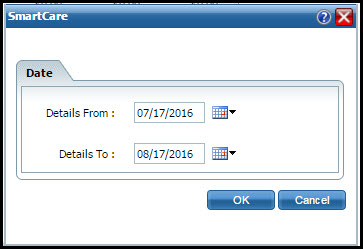
Use the calendar icons to select the Details From and Details To dates for the statement. The dates identify the activities that are included on the statement. The system defaults the current day's date in the Details To field and 30 days prior in the Details From field.
Click the OK button.
The Client Statement window is displayed. Tell me how to use the window.
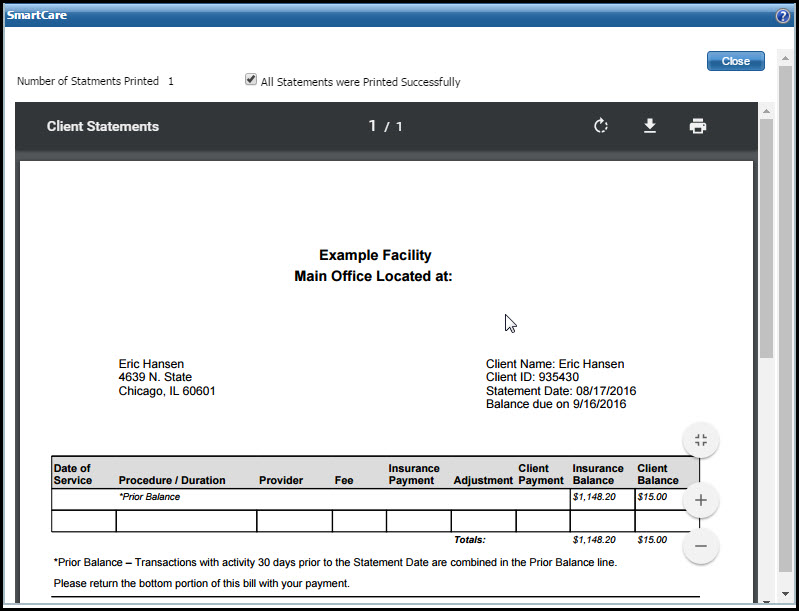
Print the statement.
Click the Close button when you are done.
Display the Client Accounts list page. Tell me how...
The Client Accounts list page is displayed. View field definitions.

Filter the list to determine the records that are displayed. Tell me how...
Select the client accounts that you want to generate a statement for.
Click the Generate Statements button.
The Date pop up window is displayed.
Use the calendar icons to select the Details From and Details To dates for the statement. The dates identify the activities that are included on the statement. The system defaults the current day's date in the Details To field and 30 days prior in the Details From field.
Click the OK button.
The Client Statements window is displayed. Tell me how to use the window.
Print the statements.
Click the Close button when you are done.