
You can quickly display the Service Note page for a specific client using the drop down list on the title bar. Refer to the red box in the figure below. The figure illustrates the SmartCare title bar.
From the SmartCare title bar, click on the down arrow in the Create Service/Notes drop down. Refer to the red box in the figure above for the location of the down arrow. The list is displayed. See figure below.
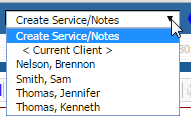
From the drop down, select:
Current client - if a client account is open, the name is listed in the client tab. Refer to the darker blue tab in the figure below.

From a list of recently accessed clients - refer to the figure after step 1 for the list.
The Service Note page is displayed for the selected client. Notice that the Status defaults to Show for the current date.