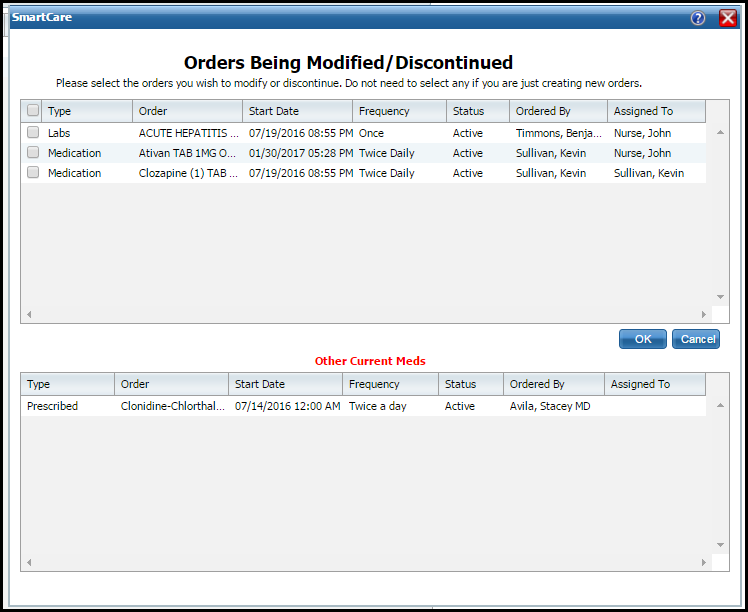
An asterisk (*) following the field name indicates a Required field in the Core SmartCare system. Your system may have been customized to require additional fields.
Field |
Description |
List |
|
<check box> |
Use the check box to select an order to modify or discontinued. If creating a new order, click the OK button without selecting a check box. |
Type |
Identifies the order type. Types are: · Medication · Labs · Radiology · Consults · Nursing · Additional · Procedures · Adaptive Equipment |
Order |
Identifies the description of the order. |
Start Date |
Identifies the start date of the order. |
Frequency |
Identifies how often the order is carried out. |
Status |
Identifies the status of the order. Statuses are: · Active · Complete · Discontinued · Results Obtained · Reviewed · Sent To Lab |
Ordered By |
Identifies which staff created the order for the client. |
Assigned To |
Identifies which staff the order is assigned to carry out. |
Other Current Meds - Identifies medications prescribed in SmartCareRX |
|
Type |
Identifies the order type. Types are: · Medication · Labs · Radiology · Consults · Nursing · Additional · Procedures · Adaptive Equipment |
Order |
Identifies the description of the order. |
Start Date |
Identifies the start date of the order. |
Frequency |
Identifies how often the order is carried out. |
Status |
Identifies the status of the order. Statuses are: · Active · Complete · Discontinued · Results Obtained · Reviewed · Sent To Lab |
Ordered By |
Identifies which staff created the order for the client. |
Assigned To |
Identifies which staff the order is assigned to carry out. |