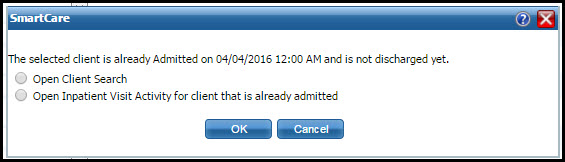
Note: This message window does not appear if your system is setup to allow a patient to be admitted to more than one bed.
When you click the drop down arrow on an Open bed, if this error message is displayed, it means you already have a client's information open.
Look in the menu tabs above the screen to determine which client's account is open. Notice the red box outlining the client's tab in the figure below.

If the selected client is not the person you want to admit, select the Open Client Search option in the error message window and click OK to display a different client.
-or-
If you need to further investigate the selected client, select the Open Inpatient Visit Activity option in the error message window and click OK to investigate the open client's activity history.
The error message window is closed.